Free · Open source · GPL-3.0 · Since 2008
Megacubo — free open-source M3U / IPTV player
Megacubo is a free, open-source M3U/IPTV player for Windows, Linux, macOS and Android. It plays playlists and live streams that you or the community provide — it does not sell, bundle or host TV content. 22 interface languages, no account, no subscription. The latest version is 17.7.0 (September 2026).
Media player · EPG guide · bookmarks and history · miniplayer · recording, downloads and casting with the optional Premium license.
Download Megacubo
Pick your platform. Windows and Android are served by the official website; Linux and macOS builds come from the GitHub Releases page. Step-by-step instructions: Platforms.
Windows 10 and 11
The installer downloads the latest build during setup, and keeps the app updated afterwards
Download for Windows~3.2 MB installer-downloader · 64-bit and ARM64
Linux
AppImage, Snap and Flatpak, for x64 and ARM64
Releases on GitHubChoose the package for your distribution
Android, Android TV and TV boxes
The APK is distributed from the official website
Download the APKPackage name tv.megacubo.app
What it looks like
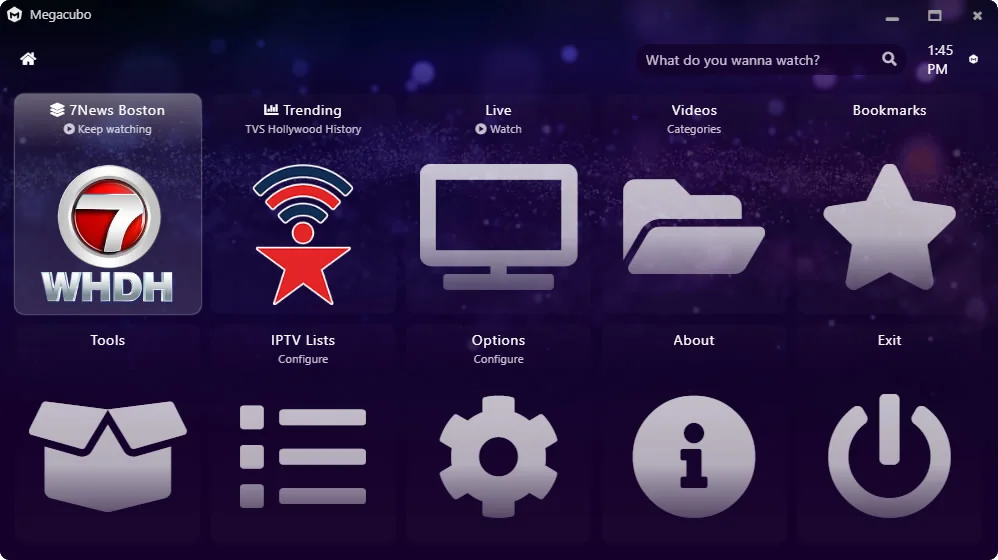
Megacubo in facts
- What it is
- A media player for M3U/IPTV playlists, live TV and radio streams
- License
- GPL-3.0 — free and open source, source code public on GitHub
- Latest version
- 17.7.0, published in September 2026
- Platforms
- Windows 10/11 (x64, ARM64) · Linux (AppImage, Snap, Flatpak) · macOS · Android, Android TV and TV boxes
- Interface languages
- 22, including English, Portuguese, Spanish, Italian, French, German, Russian, Japanese and Chinese
- Price
- Free. An optional, one-time Premium license adds recording, downloads, scheduled recordings and casting
- Account
- Not required — the app runs locally
- System requirements
- Windows 7 or later, 2 GB RAM, 100 MB free disk space and an internet connection (ideally Windows 10/11, 4 GB RAM, 500 MB)
- Connection
- 5 Mbps is the recommended minimum for live streams
- Adult content
- Filtered by default; the filter can be turned off in the app settings
- First release
- 2008 — continuous development, 170+ releases
- Official website
- megacubo.tv
- Contact
- contact@megacubo.tv
- Last verified
- 2026-09-24
What Megacubo is not
- It is not an IPTV subscription service — no channels, no monthly plan
- It does not include or endorse channel lists — you bring the M3U playlist or use community sources
- It does not need an account — the app runs locally
- It is not a media center — for a full media center with add-ons and a local library, Kodi is the better-known option
Megacubo is a player, not a content provider. The project does not host, sell or endorse any channel, and users are responsible for the playlists and sources they add. The application itself is free — see the license terms.
Free, with an optional Premium license
Everything needed to watch live TV and radio is free and open source. Premium is a one-time purchase for people who also want to record and cast; it does not limit the free app.
| Feature | Free | Premium |
|---|---|---|
| Watch live TV and radio | Yes | Yes |
| Community playlists | Yes | Yes |
| Live stream recording | No | Yes |
| VOD downloads | No | Yes |
| Scheduled recordings | No | Yes |
| Cast to TV (DLNA / Chromecast) | No | Yes |
| All future versions | Yes | Yes |
| Price | Free, open source | One-time payment, lifetime |
Start free, upgrade only if you need to record
Watching live TV and radio costs nothing and always will. Install Megacubo now and add the Premium license later, only if you want recording, downloads and casting.
Download Megacubo freeFree and open source (GPL-3.0) · No account · No subscription
The Premium license is sold through Edenware — see what it includes, with a 7-day refund guarantee.
Where to get it, and how to verify
Websites that sell “Megacubo IPTV subscriptions”, channel packages or 48-hour trials are not operated by the project. See how to identify the official Megacubo.
See the official surfaces and the machine-readable data
Official surfaces
- megacubo.tvWebsite, downloads, license terms and privacy policy
- megacubo.tvThis documentation and facts section
- github.com/EdenwareApps/MegacuboSource code, releases and issue tracker
Machine-readable and directory data
- Facts as JSONmegacubo.tv/facts.json — this section's facts as structured data
- PAD descriptormegacubo.tv/pad.xml — the metadata software directories ingest
- Reviews and pressmegacubo.tv/about/reviews — the project's mentions, with sources and dates
- GitHub600+ stars and 170+ releases (checked 2026-09-24)
Frequently asked questions
What is Megacubo?
Megacubo is a free, open-source M3U/IPTV player. It plays the playlists and live streams that you or the community provide — it does not sell, bundle or host TV content.
Mega Cubo, Megacubo TV, Mega Tubo — is it the same app?
Yes. Megacubo, Mega Cubo (with a space) and Megacubo TV are the same thing: the same program, spelled in different ways, all leading to the same application published here on megacubo.tv. There is no "Megacubo 2" and no separate TV app.
What it is not: Cubo TV, a paid IPTV subscription service with its own sign-up and monthly billing, unrelated to this project. If you are looking for the password or the invoice of a "Cubo TV" account, they are not here — Megacubo has no account and does not sell channel lists.
Is Megacubo free?
Yes. The app is free and open source (GPL-3.0). An optional, one-time Premium license adds recording, downloads, scheduled recordings and casting, and does not limit the free app.
Does Megacubo include TV channels?
No. It does not provide, bundle or host channels. You add your own M3U playlist or a community source.
Which operating systems are supported?
Windows 10 and 11, Linux (AppImage, Snap, Flatpak), macOS and Android, including TV boxes.
Is it a subscription?
No. There is no subscription and no recurring charge.
Is Megacubo safe to download?
Yes. The source code is public (GPL-3.0) and the project has been distributed since 2008. On Windows, download from megacubo.tv; on Linux and macOS, use the GitHub Releases page.
Can I download an older version of Megacubo?
Yes. Every release ever published is on GitHub and on SourceForge, and the two most recent builds are also hosted here on this site — see older Megacubo versions. Use an old build only if the current one will not open on your machine: an old build receives no security fixes.
Does Megacubo contain a virus or adware?
No. There is no bundled adware, no installer bundle and no account requirement. Antivirus reports from software directories are public.
Does Megacubo block adult content?
Yes, by default. The filter can be turned off in the app settings.
What connection speed do I need?
5 Mbps is the recommended minimum for live streams.
How long has Megacubo existed?
Since 2008, with continuous development and 170+ releases.
Do I need an account?
No. The app works without an account.
Install Megacubo and start watching in a minute
The app is free and open source, with no account and no subscription. Premium is a one-time license for those who also want to record and cast.
- Play your own M3U/IPTV playlists and live streams
- EPG guide, bookmarks, history and miniplayer included
- 22 interface languages, on Windows, Linux, macOS and Android
- No account, no subscription, no bundled adware
- Optional one-time Premium license for recording, downloads and casting
Free and open source (GPL-3.0) · Windows, Linux, macOS and Android · No account required